How to Add Animations on Squarespace Websites
Watch the Video
Check out the YouTube video below 👇
Want to Add More Movement and Visual Appeal to Your Site?
If your website feels a little static or flat, adding animations can instantly make your pages feel more modern, engaging, and dynamic. Squarespace has built in animation options that let you add subtle movement across your entire site without needing any code.
In this guide, you’ll learn exactly where to find these settings and how to adjust them to match your brand’s look and feel.
Where to Find Squarespace Animations
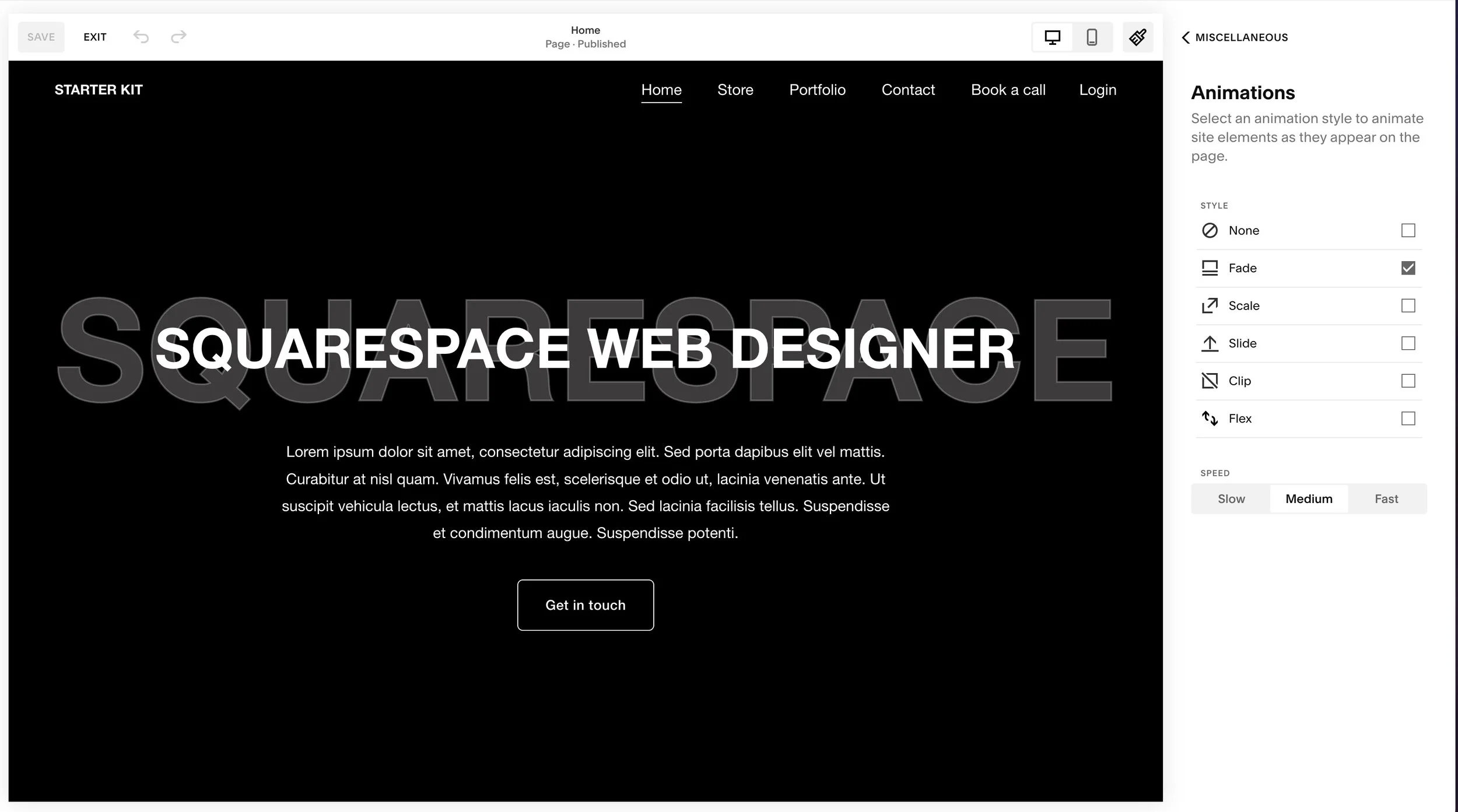
To get started, head to the top-right corner of your Squarespace dashboard and click the paintbrush icon, also known as Site Styles.
Once Site Styles opens, scroll to the bottom of the panel or click the Miscellaneous section. Here is where you’ll find the Animations menu.

Choosing & Previewing Animation Styles
Inside the animations panel, you’ll see several built-in options you can apply globally to your site:
Fade
Scale
Slide
Clip
Flex
Click through each effect to preview how it looks. As you scroll down the page, you’ll see different sections fade or slide into view so you can get a live feel for how each animation behaves.
Adjusting Animation Speed
If you select Scale, you’ll notice extra settings for adjusting the animation speed:
Slow
Medium
Fast
You can switch between these to see which timing feels right for your website’s style and pacing.
Once you find the animation and speed you like, make sure to click Save.
See Your Animation in Action
After saving, refresh your site. As you scroll down the page, your new animation will trigger automatically. These animations apply across your entire website, enhancing every page with smooth, professional motion.
Conclusion
Adding animations is an easy way to bring life and visual interest to your site. The feature is slightly tucked away inside Site Styles, but once you know where to find it, adjusting and testing animations becomes simple and intuitive.
If you run into any issues or can’t locate the animations panel, drop a comment, I’m happy to help. And if you’re looking for a designer to build or refine your Squarespace website, feel free to reach out anytime.
Your Designer
I’m Dylan, a Squarespace website designer. I’ve created amazing websites for multiple clients across different industries from E-Commerce sites to Real Estate and Insurance brokers. If you’re looking for a website and want to discuss a potential project, email me at dylan@highrlabs.com. You can also schedule a free 30-minute consultation call