Built Your Site With Lovable, Bolt or v0? What to Fix First
 By Dylan BindrupFounder of Highr Labs · Squarespace Circle Platinum Partner
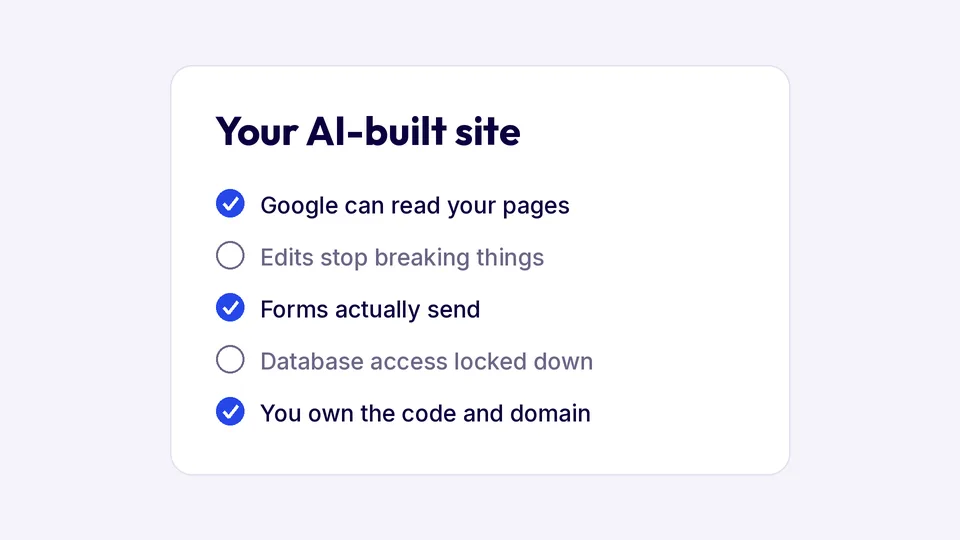
AI builders like Lovable, Bolt and v0 get a site 90% of the way there in an afternoon. The last 10% is where people get stuck: the site doesn’t show up on Google, a small change breaks something else, the contact form goes nowhere, or nobody’s sure who can see the data. Here are the five things I check first on every AI-built site, in order, and what to do about each one.
1. Can Google read your pages?
This is the most common problem. Many AI-built sites are client-rendered React apps: the server sends an almost empty page, and the text only appears once JavaScript runs in the browser. Google can run JavaScript, but later and less reliably, and many AI search tools don’t run it at all. The usual symptom is pages stuck on “Discovered, currently not indexed” in Search Console.
To check, open your site, right-click and choose View Page Source. If your headings and paragraphs aren’t in there, search engines are seeing a blank page. The fix is prerendering or server rendering, so every page arrives complete. It’s a technical job, but a one-time one. More in why a website doesn’t show up on Google.
2. Edits that break other things
Prompting is fast for small changes, but the AI doesn’t always know what else depends on the code it’s changing. A new section on one page can quietly break the layout of another, and every attempt to fix it uses more credits.
Two habits help: sync the project to GitHub so you can roll back, and test the whole site on a phone after each round of changes, not just the page you edited. If you’re going in circles on the same bug, that’s usually the point to get a person to look at the code.
3. Forms that don’t send
AI builders are good at making a form look right. Whether it actually sends the message anywhere is a separate question. Fill in your own contact form with a test message and check that it arrives where you expect, including on a phone. Then check your spam folder. A form that silently drops leads is the most expensive bug on this list.
4. Who can see your data
If your site stores anything, like signups, bookings or user accounts, check who can read it. Lovable projects usually store data in Supabase, where access is controlled by row-level security policies. If those policies are missing or too loose, anyone who finds your site’s public key can read the tables. Review them before you collect real customer data, and never put secret keys in the front end of the site.
5. Who owns the code and domain
Make sure the domain is registered in your name, the code is exported to a GitHub account you control, and you know where the site is hosted and who pays for it. If the person who set it up disappears, you want to be able to hand everything to someone else in an afternoon.
Your options for help
- Fix it yourself. Fine for small issues, with GitHub sync turned on so you can undo mistakes.
- Hire a developer by the hour. Good for one specific bug. Make sure they can read and change the code directly, not just prompt the AI.
- Hand off the running of it. I host and maintain AI-built sites on their own stack: hosting, deploys, fixes and SEO, from $100 a month billed yearly. No lock-in: leave whenever you want and take everything with you. See AI website hosting.
- Rebuild it on Squarespace. If you’d rather have a site anyone on your team can edit, I rebuild it at a fixed price, with redirects so you keep what you’ve built up in search. See moving an AI site to Squarespace.
Not sure which one fits? The Lovable vs Squarespace comparison walks through when each one is the better home for a business site.
Frequently asked questions
Why isn’t my Lovable site showing up on Google?
Usually because the pages are rendered in the browser, so search engines see a mostly empty page. Check View Page Source for your text. Prerendering or server rendering fixes it.
Can someone finish a site I started in Lovable or Bolt?
Yes. Export the code to GitHub and a developer can pick it up from there, or keep it on the same tool and hand off the maintenance.
Is it better to fix my AI-built site or rebuild it?
Fix it if the site works and you like it. Rebuild it if you’re fighting the same problems every week, or if people on your team who aren’t developers need to edit it.
How much does it cost to maintain an AI-built website?
My plans start at $100 a month billed yearly for hosting, deploys, fixes and a one-time SEO and AI search setup. Hourly developers vary a lot, so ask for a quote on the specific problem.
Stuck on an AI-built site? Book a free call and I’ll tell you whether to fix it, hand it off or rebuild it, including “you can do this yourself” when that’s the answer.
Related guides: Lovable vs Squarespace · Squarespace vs AI website builders
Rather have it handled? See AI website hosting or moving an AI site to Squarespace.